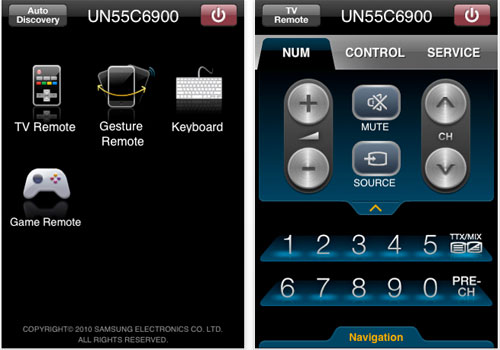
Samsung has released a TV remote control app on Apple’s App Store. The free app allows users to control their television sets over Wi-Fi. The app allows to perform basic remote control functions by touching the onscreen controls or control it via gestures to change the volume/channel with the help of accelerometer after touching the screen. It also doubles up as a keyboard and a game remote control for games on Internet@TV.
The app sounds promising but here are some requirements to make it work. Firstly, users need to have Wi-Fi in their TVs or buy a USB Wi-Fi dongle separately from Samsung and secondly, the app will work with 2010 TV Models with Internet@TV only.
Some 2009 models also support Internet@TV so technically it should work but we cannot confirm it. Maybe you can download the app from here and let us know.
[Thanks, Mark!]
Good luck getting this to work. I have a 2010 8000 series connected to the same router as the iPhone, and the only thing this app does is show an “auto discover” screen for a few seconds and then freeze.
Total Control Remote Edition – Iphone/Itouch IR Remote
http://www.totalcontrolapp.com
or
http://totalcontrolapp.com/index.php?option=com_content&task=view&id=108&Itemid=92
Features
•Iphone and Ipod Touch compatible
•Ability to control IR (Infared) products. Requires use of addition hardware components. See website for more information.
•No dongle, PC, or server required for application. Direct control between application and hardware appliance.
•’Profiles’ – support for multiple personalized user configurations.
•Mutiple sub-category support for ‘layered’ configurations.
•Device listing for easy access to control pages
•’Favorites’ tab for quick device access across configurations
•Application utilizes database of hundreds of thousands of IR codes from hardware component.
•Application utilizes hardware built in ‘learner’ to learn any remote. Learn single buttons or whole remotes.
•Security settings for commercial applications. Lock down/hide parts of the application so it is safe for public use.
• macro and punch through support
This DOES NOT WORK.
App opens on a white screen and after the circle thing stops counting down it just hangs?!!
I have a shed load of expensive Samsung HD gear that I bought 3 months ago and frankly I’m pretty hacked off that Samsung have released this before it is fully tested.
I am one unhappy Geek!
The Samsung UN40C6300 does not work with the remote app. I’m hopefull that someone will figure out a way to make this work or that Blu-ray players will be added to the list of recognized devices, such as the BD-C6500.
Most of the time the app stays in discovery mode, but I got a couple of times the TV listed, but then got a message about tv not being set up…
What app is this?
This app is not working on my 2010 samsung with Internet tv. Perhaps it needs to be connected with LAN 10/100 cable? I now use samsung wireless plugin. I will uninstall this app for now.
This app is rubbish ! doesn’t work.
Those not able to make it work. Try turning the TV on BEFORE starting the app. See if it works then.
I work at an electronic store this app only works with the un55c8000 for me
I tried this app. Works great on UN55C7000 . However, WiFi is not required as mentioned in this article. TV could be connected to the router via Ethernet cable.
I love this app because of soft-keyboard that the iPhone app provides for TV. Searching videos on youtube or logging in to FB account becomes very easy.
I posted some iPhone app screenshots at:
http://bit.ly/9ZmaJN
http://bit.ly/aszG9D
http://bit.ly/95oZ0z
http://bit.ly/aMxjgV
http://bit.ly/ao1uJU
this app doesn’t work to control UA46C7000WM, which is latest 3D TV ! what’s going on Samsung ?
Did you enable the “wireless remote” setting in the TV menu already. If not it will certainly not work. Works without problems for me on a UE46C7700.
Hi HDTV
the wireless function is work and can upgrade apps through our wireless network and also share movies on my PC.
where can I find enable the wireless remote setting in TV menu ? I can’t find it. pls help
You need a 2010 C-series Samsung TV . My TV has Dutch menu structure so I am not sure what the English menu will look like.
iTunes states:
“Directions : The Wi-Fi remote control performs only when connected to the same router as SAMSUNG TV and “Wireless remote control” in the setup menu should be switched on.”
My TV UA32C6900VM
My iphone 3GS also can’t search anythings.
– same network (same router), Lan cable or wireless also can’t work
– ALLShare Enable
– Can’t find “Wireless remote control” in the setup menu
Please Help
I ringed to Samsung customer service and got a feedback from their engineer that still can’t use it in their evaluation at HK samsung centre. so this app is useless in HK for any latest 2010 internet TV model. Pls wait a new version.
This app works great on my 46c8000. My only issue is that I cannot use the app to turn on the TV. Cannot detect the TV until powered on. Is there something in the TV menu that needs to be changed?
My assumption is that wireless network is off in standby mode which would prevent the remote to communicate with the TV.
Why will Samsung not support this app on Internet based Blu-Ray players like the BD-C6500? Seems to be the same functionality!
Having had the C6500 for a couple of weeks now, there are a lot of features and functionality that are pretty scrappy!
This could be a great device, but falls well short. I can see why it hasn’t taken off.
What if you have multiple Samsung TVs on the same network. Will you be able to pick the TV you want to control or will the app apply your changes to all TVs at the same time ? Please advise. Thanks.
i’m going to try!
I have LE37B650. Cannot find wireless remote option on my TV although it has usual Wi Fi and DLNA stuff. I wish to control my Samsung TV (Above model) with my samsung galaxy S. Any idea?
@Shirish: Only 2010 models are supported
Why does Samsung not simply release a quick firmware update for the TV models with Internet@TV to also include 2009 models. I feel slightly discriminated having bought my TV just a few months earlier.
Well Flo don’t feel so bad, as new technology comes out every year. It’s bound to happen that someone buys a TV and then the following year a new feature comes out. It happens all the time for cars, should the car manufacture be made to retro fit an older model for free just to suit a consumer that wants to compete with the Jones? No, it just doesn’t happen. So this is where you look at all avenues before you buy something. As I understand it, there is a different processor that is in the 2010 TV’s than in the 2009 TV’s therefor a firmware upgrade would do no good. Just as with computers. So if you want to feel discriminated I’m sorry that you feel that way. I’m sure that they don’t intend it that way.
@Frank. I sort of agree with you. The question is whether there is or will there be a app developed by Samsung or 3rd party to control 2008/09 models. It seems that the control is via Wi Fi nd not usual inrared. Samsung galaxy s, through its “allshare app” can stream videos, control TVs volume, jump forward the video, there is very little left to incorporate in a stand alone remote control app for older Samsung models. Technically it seems feasible, what say….
This app doesn’t work on my 55” series 8000 LED Tv and they are both on the same router
I have new series 7 50 inch 3D plasma. The app works great. If you get a frozen screen when auto detecting try setting up manally.
Eg. Ip 192.168.0.30
Subnet mask. 255.255.255.0
Then your router ip. Like
192.168.0.254 for gateway.
Then your ISP dns. Like 203.12.160.35
This worked for me.
Anyone has an idea of why can´t I download this app from iTunes? I can see the link on the internet (http://itunes.apple.com/us/app/tv-remote/id359580639?mt=8) but I can’t find it in my iTunes nor searching with my iPod Touch. Any other place where it can be downloaded? I want to try it with my 2010 UN46C7000WMXZB. Thks!
i just buy c6900 and it didnt work too… what a sxxk manufacturer
App doesn’t work with Samsung 8000 series LED TV bought new about one month ago. iPhone just says that the devices have to be on the same access point ……. please check network settings. Looked at network settings and devices on the network (via laptop) and they were all there! Crap App !
I was finally able to download the app from iTunes… I had to establish a US iTunes account. The app works fine with my TV (UN46C7000WMXZB)… for me, it’s a great app!
Everyone that can’t get this to work. Always be sure your TV is powered On First. Ie you have a picture. And that you have a network connected and setup FIRST. The app is not able to turn on your TV. But can be used to turn it off. -Scott-
@Cavan,
I have the 55″8000 series and the app works fine, the tv is wired into a router and the iphone picks it up from there wireless. Initial search brought a confirmation screen on the tv to allow access for the iphone, but does it automatically once app is started.
Cannot get access to the app through itunes store. Need US account. In South Africa. Anyone have app file somewhere else and don’t mind sharing?
Hi Brian! I had that problem too… i had to trick iTunes Store and open an account in the US, for that matter only (I found plenty of forums explaining how to do it). Once I did that, i donwloaded the app and installed it both on my 1st and 2nd generation iPod Touch and it works perfectly with my UN46C7000WMXZB, made in Brazil. Hope it helps!
have noticed,with increasing anger and despair, that Samsung have little interest in developing anything that makes it easy to use Mac with Samsung, whether it be internet wireless or connecting a mac to tv. this is despite them being a provider for mac!!!
all they ever say it is too hard, yet they are working with mac…..who is the stopper here??
So, in my family we have iPhones and an Samsung Galaxy (Captivate from AT&T).
The iPhone work perfectly with my 58c7000.
Anyone know why there isn’t an app for a the SAMSUNG PHONE! 🙁
Anyone even heard of an Android based version coming?
Mike
Thanks 94jdh.
My set is a UE40B8000. iPhone app doesn’t work at all.
My son has a “C” series Samsung TV and the app works fine on that.
Seems to be a problem with the “B” series.
Well disgruntled with Samsung for abandoning “B” series owners.
Cavan
The iphone remote application does not work for my plasma TV PN58B860. I have already internet connection in TV. Application needs update.
I live in Ireland, why can i not find the app?? is it still US iTunes only??! This is very annoying. Any way i can get it without having to create a US account?
My 3GS operates the volume on my samsung tv and I don’t have the foggiest how it happened? Anyone got some insight on how this happens as the phone was in my back pocket and it sent the volume to max!!
I tried this today on my 6 series tv – UE40C6000 and it works perfectly. I first upgraded the firmware which is easy if your tv is connected to the internet. Mine is not connected via wireless but ethernet cable.Then ensure wireless remote option is on in network settings.
@mas
Seems that all “C” series TVs work with the app. It’s only the “B” series that Samsung has abandoned, even though many of us only bought one a couple of months ago. What I fail to understand is why Samsung still had/has the “B” series on its web site as a “top of the range” TV, even though it had been made obsolete. Very bad practice and will inevitably lead to the demise of Samsung (if I have anything to do with it!).
Hi!
I didnt find the app in the app store, what’s the name of the app?
thx!
ps: i have samsung b650 will it works?
Any idea samsung rekeases app for samsung phones to control samsung tv.
Ridiculous in not having one..
@mas
In support > software upgrade > by online, my ue40c6005 says there is no software to upgrade. And then I move over to the setup > Network but there is no “wireless remote option” there. I have no luck in hooking my iphone and my samsung tv together.
What can I be doing wrong?
I just purchased a UN46C6300SF last week, and have it wired to my network and cannot get the remote app to work either. I have not tried the update, then adding the wireless control to it, so maybe I will have success after that.
I have Samsung UN46C6300 and a blu ray c5500. I dont have the “Wireless remote option”. Any help on this?
I can’t get it to work.
I connected a UE40C6740S with samsung wireless USB stick and a UE32C6740S with a cable to the same network and accesspoint.
Ipod os4 with app connected to the same accesspoint.
Both are C types.
After starting the app it does an auto discovery but no results.
Updated both TV’s to softwareversion 2010/11/04_003003. (Previous version 002004)
Anyone with tips?
Thanks, dvdb
I copied and pasted this option from the earlier post..
Did you enable the “wireless remote” setting in the TV menu already. If not it will certainly not work.
Veera thanks for your comment.
It works.
The wireless remote (Dutch: Draadloze afstandbediening) was set to on (Dutch: AAN) but I could not get a connection.
This is what I did to solve the problem for me:
– Set the wireless remote option to OFF (Plug and play menu, last option)
– Push enter and quit the menu and switch the TV OFF and ON
– Start the app on the ipod/iphone and do a auto discovery. The app can’t find the TV because the option is set to OFF.
– Set the wireless remote option to ON
– Push enter and quit the menu and switch the TV OFF and ON
– Start the app on the ipod/iphone and do a auto discovery. Now the app found my TV set and I could use the application
Hope this helps for other people.
For me the app works with a UE40C6740S and a UE32C6740S
DvdB
dvdb….well done this worked for me 🙂
Those who cant see the wireless remote option….it is at the bottom of the ‘plug and play menu’ just scroll down it is there.
I have a 7 series connected via Lan and wireless netgear router.
Hi, I just tried this but for some reason the Plug and Play menu is greyed out and I can’t select it? I have a UE46B8000 with @Internet tv etc… Its running the latest firmware as well which is 3002/
Any ideas as to why my menu is restricted?
Steve,
I read the app works only with C type tv’s.
Maybe that is the reason?
Are all options in the plug and play menu are grayed out?
Do you see the remote control option?
DvdB
Works great, don’t know what all the complaining is about.
I had problems at first as well, and aside from the remote control option being turned on (under the plug and play from the menu), I also had to push the CONTENT button, scroll over to AllShare and it detected the remote app.
on tv you have to go to menu>setup>wireless remote control
set up instructions follow
if not “wireless remote control” option then not compatible
Does not work. Followed all instructions, bummer. Im so sad. Really wish it did.
hey you Puss**s.. RTFM Read The Fu**ing Manunal!!!
ist CLEARLY written, you will need at least a 2010 **C650* or above to connect with the IPhone !!!!!!
but does someone know the Ports the App uses?? I have a special Lan Setup and need to setup kind a Portforwarding
regards
I too have a UE40C6000 and I cannot find the wireless remote option on the menu. The manual states that this option should be there, but it is not visible.
mas could you please let me know on your tv (UE40C6000) where this menu option is, I’m wondering if a firmware upgrade has removed it?
Hi there,
An update of the App has been released, with the Effect that i now cant connect to the tv anymorr
Is it possible to stream iPhone music to my le46c750?
It is driving me nuts! I have tried everything!
Many thanks
John
Hi!
I have just coped the ue40c6005 and can’t find the remote menu??? Got the latest firmware as well, please how can I fix this? And I coped this tv just because of this function.
Works nicely on 40C6530 using wired connection over homeplug network to adsl. Had to use manual network settings and it worked. Initial connection has to be authorised by tv remote and it then auto connects. Great App
Up until today I fell into the “i have the right tv, but it still doesn’t work” category. I FINALLY figured it out. It was my wireless router. I have qwest DSL and I was using the qwest wireless router/modem combo as my access point. The problem was the qwest router. I am not sure what it was doing but once I eliminated it from the equation they connected. Simply put a linksys (or preferred non-crappy router) between your modem and the tv/iphone as the access point. Hope this helps the 25% that still can’t get it to work.
TV is UN55C6500
I hope they update to work with all “B” series 🙁
love it ! , better than the samsung remote .. 3gs
I have a C700 model. It works fine with some all other wireless networks then mine. I have tested it with friends wireless network and the iphone application controlled the TV but when i choose my wireless network it can not pass the searching for TV part on iphone. Is there a specific setting on router that may interrupt the communication between iphone and the TV?
This looks like a great app but will not work for me.
it Detects and connects to my LN46C650 fine but after around 4 seconds it disconnects saying “network “Disconnected.. Network Connection Failure..”
Durring that 4 seconds I can control the tv fine. Its just a giant tease this would be so cool if it worked!!
if anyone knows a fix to this please send me an email I would be REALLY greatful.
[email protected]
Sofar the App worked flawlessly with both my iPhone 3GS and Ipad in combination with the UE46C7700.
However, suddenly the App stopped working while settings on the TV are unchanged. iPhone and Ipad are still displayed in the TV menu as valid devices.
Unclear what the reason is. I updates both my iPhone and iPad to iOS 4.3 but would be surprised if that caused this problem.
By the way, my Samsung Galaxy Tab still works correct as remote.
Update to my own posting: It looks like iOS 4.3 created the problem
http://forums.cnet.com/7723-13973_102-519723.html?messageId=5098583
Works on samsung blu ray player BD D5700 with wifi
Auto discovery says it is a samsung dvr,but
WhO cares!!
Great to search for movies with keyboard:)))
seems it depends on region, if visit the UK website
http://www.samsung.com/uk/consumer/tv-audio-video/television/led-tv/UE40C7000WWXUA/index.idx?pagetype=prd_detail&tab=specification
I can see the UK model UE40C7000 has the “Wireless Remote Control” under the feature list
but Hong Kong model UA40C7000 doesn’t show this option in it’s spec.
http://www.samsung.com/hk_en/consumer/tv-av/televisions/led-tv/UA40C7000WMXZK/index.idx?pagetype=prd_detail&tab=specification.
Yes, mine is UA40C7000…………. and it doesn’t allow me to upgrade to UK’s firmware.
it’s a kind of discrimination against Asian by a korea brand?
also the india model doesn’t show this option in it’s page.
http://www.samsung.com/in/consumer/tv-audio-video/television/led-tv/UA40C7000WRMXL/index.idx?pagetype=prd_detail&tab=specification
Uncheck uPNP in your router, if not it can’t find the TV…
Has anyone tried this app with the ps50C680 50″ 3D tv there is not wireless remote funtion but its a c series has allshare and is plug via ethanet cable to router. Is there any other ways on getting this app to work. Also using samsung galaxy tablet
Re:Kalyan sankar – I just purchased the BD D5700 but the app detects it as a TV and fails saying tv menu not set up properly. Did you have to change any settings to get your to work the way it did?
Thanks
I just downloaded this App from apple store and tried to connect to my 55C9000 samsung. My TV is not listed. I’m using the wireless dongle to update the Internet@TV channels.
My iOS is the 4.31 and an Iphone4.
My router is far away to the TV. It’s not possible to connect with a cable.
Did you ever have any luck David? I have the same television. Hasn’t recognized it yet. I have same phone but it’s a Verizon.
After trying several times, worked fine.
I have LN40B650 model, Internet@TV is available. I am trying to connect my ipod 4g with my TV with this app but yet no luck. The auto discovery screen stays all the time. Please advise.
Thanks
Its for ‘C’ models only 2010 tvs…
Well that’s explain a lot.
no more keyboard functionality in the app? that’s really lame samsung.
useless app.
Hi Mark… thanks for this posting. Quick question. I have the newly discontinued UN55C9000 and have successfully set it up on the home WiFi network. However, after downloading the app, it never recognized the TV. I have a Verizon iPhone and have this growing suspicion that there is a firmware bias/delay there. Any thoughts?
HAS ANYONE REALIZED THAT NO MATTER HOW FLAWLESSLY IT WORKS, YOU STILL CANNOT TURN THE TV ON. IN OTHER WORDS, YOU HAVE TO HAVE THE TV ON FIRST BEFORE YOU EVEN CONSIDER USING IT. NOW THAT’S LAME. THE TV SHOULD HAVE THE OPTION TO STAY CONNECTED TO THE NETWORK AT ALL TIME EVEN IF IT’S OF. I HAVE A SIMILAR APP FOR MY DENON RECIEVER AND I CAN ACTUALLY TURN IT ON USING THE APP. SMART THINKING DENON. LET ME KNOW GUYS IF THERE IS A WAY AROUND IT, THANKS..
I’ve been actually looking for an answer to that, to see if could turn my TV on with the app, but I can see by your commentes it’s not.
Same problem and complaint here Hope samsung takes care of it soon. It sucks you need to have your remote beside you as well.
I have a brand new UN60D6500 and cannot get it to work with my iPhone, iPad or Android Phone. The TV recognizes my wireless Router and connects to the internet but I cannot get any of those devices to work. I’m using an older Linksys G Wireless Router.
Any suggestions?
Hello, according to the description on the AppStore it should work with Internet@TV capable TVs from 2010.
I have a UE40B8000 from 2010 with Internet@TV Feature, shouldn’t it work?
Thanks
Rui
My Samsung 7000 series tv is not being detected by the app. Can someone please help with this problem? Thanks 🙂
My iPad app has stopped working, I get a network connection error. Until recently it worked fine on both the tv (ued8000 and blu ray player bd5530. I think the latest s/w update has caused problems. Anybody else had this problem and solved it?
Just solved this myself.
I had the same problem after I updated my iPad OS. What you need to do is remove the device from the allowed devices on the TV and then re-add your iPad just like when you first installed the Samsung iPad app.
Hope this helps…
Same problem worked until I updated my iPad.
I have the same problem. Allways get network Connection error since I update to latest iOS. reinstall doesn’t help nor anything else. Also remove and readding as Remote doesn’t work.
When I go to use app it saws network connection failure. Everything on tv is set up properly.
Same for me. The ap worked fine until recently, can not seem to fix with disconnecting and connecting