• Skip to main content
  • Skip to secondary menu
  • Skip to primary sidebar
  • Home
  • About
  • Contact Us
  • Tip News!

Sammy Hub

Ultimate resource for all Samsung news, leaks, reviews

  • Phones
  • Tablets
  • Wearables
  • TV
  • Hardware
    • Components
    • Storage
    • Monitor
  • Software
  • Tech
  • Home Appliance
You are here: Home / Phones / Samsung releases OTA update for Epic 4G, brings Media Hub and few fixes

Samsung releases OTA update for Epic 4G, brings Media Hub and few fixes

September 17, 2010 By kunal 4 Comments

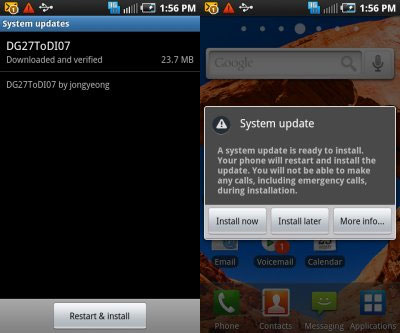
epic-4g-update


Samsung Mobile USA has just tweeted to let Epic 4G owners know about a new over-the-air (OTA) firmware update. The DI07 should be available to users and brings Samsung Media Hub that is scheduled to go official at the event later today. Media Hub is an app that allows to purchase or rent TV shows and movies. Check out a small demo here.

Other bug fixes and improvements are:

– Optimized, HotSpot in 3G idle mode to help conserve battery power
– Optimized, Applied Qualcomm patch for performance enhancement
– Added, Media Hub
– Modified, WiMAX exit delay
– Modified, UI “Noisey” One to “Noisy One”
– Fixed, 32GB mSD card is not recongized when formatted in device
– Fixed, When playing video, the playback is paused if a headset is connected/disconnected
– Fixed, Sorry popup when DRM file is selected in the Gallery
– Fixed, Hotspot registration/deregistration

More information at the link below.

Samsung

Reader Interactions

Comments

  1. Albert says

    September 17, 2010 at 4:28 am

    Still can’t update my Epic

    Reply
  2. samuel acevedo says

    September 17, 2010 at 7:50 am

    I’m not getting the update can I do it manualy ???

    Reply
    • kunal says

      September 17, 2010 at 11:37 am

      @samuel @albert: On what firmware are you’ll on? Your Epic 4G must run on DG27 to receive the DI07 update

      Reply
  3. Melissa says

    September 19, 2010 at 3:01 pm

    So I did my upgrade today and now the audio (sound when I type) for my keypad doesn’t work! It was working just fine before I did the upgrade and now its not. Even though under swype settings “Audio Feedback” is checked off (meaning it is turned on) I get no sound while typing. Very irritating and frustrating! Can anyone help???

    Thanks

    Reply

Leave a Reply Cancel reply

Your email address will not be published. Required fields are marked *

Primary Sidebar

Search

Subscribe Now!

Recent Stories

Samsung galaxy-z-trifold

Samsung Officially Unveils the Galaxy Z TriFold: Full Specs, Price, and Release Date

Samsung P9 Express

Samsung Introduces microSD Express Card for Nintendo Switch 2

Samsung and OpenAI collaborate for AI Advancements

Samsung and OpenAI Collaborate to Drive Next-Generation AI Infrastructure

Samsung-Mobile-Galaxy-S25FE

Samsung introduces Galaxy S25 FE with focus on accessibility to Galaxy AI

Samsung Plus TV

Widespread outage knocks Samsung Smart TVs offline

Copyright © 2025 ยท Sammy Hub