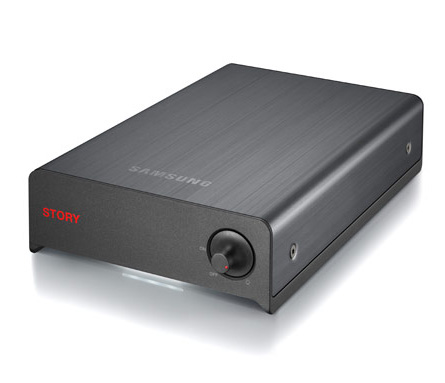
UPDATE: The drives will be released by the end of this month for $299 (2TB).
Current Samsung STORY Station HDDs support only USB 2.0 interface but now with the arrival of STORY Station Plus, the new external HDDs also support eSATA. Winner of Good Design Award, the STORY Station Plus will give users the freedom to use USB 2.0 or eSATA for faster data transfers. USB 2.0 has transfer speeds of up to 480Mbps whereas eSATA transfer speed goes up to 3Gbps.
STORY Station Plus comes in capacities of 1/1.5/2TB options and boasts features like Auto Backup, SecretZone, SafetyKey and 0.09W power consumption in standby mode.
This drive, with eSATA, has been been reported as being available, world wide from November 2009. It is now February 2010, and I have not seen this “PLUS” version of the Samsung Station Story, for Sale, anywhere. Certainly not in the UK
That’s right Brian. I’ve been looking around here in Belgium and in Holland for two months now. Nowhere available, no pricing, nothing.
I’m in Israel and couldn’t find it at the leading suppliers – but the local distributor here had it in stock and mine was delivered today. Story Station Plus 1 TB, with USB 2.0 and eSATA. The main reason I got this one instead of the USB 2 is for SMART reporting. I don’t have the eSATA connected yet and I’m not sure yet if the enclosure/cards transfer SMART reporting data. I’m also not sure if the eSATA will give you any faster speed over USB 2; the disk might be the bottleneck. Try asking your local SAMSUNG distributor directly. I don’t know why they are holding back; they have seem to have SOME in stock. NB If anyone knows if this disk supports SMART reporting, please update this board. Thanks.
We have about 10 Samsung Story 1.5TB, and 3 use esata, on different OS’s(XP, 7, Ubuntu). All encounter problems with data transfer via esata, the computer stalls and get unresponsive while transferring and browsing data.
On USB they work properly.
Follow-up on my earlier posting:
I’ve been using the 1 TB Story Station Plus, mostly via eSATA but also sometimes via USB (on another computer). Both Win XP. It has worked just fine for me. I have transferred hundreds of GB back and forth and have checked most of it with MD5 hash checksums (i.e. have checked every single one of the literally trillions of bytes I have written) and have encountered no problems. I’m fairly happy. Oh, it reports SMART data nicely, so I can see temperature, ECC corrections, etc and except for a slow spin-up time, everything is working quite nicely. (SMART reporting is one of the reasons I wanted the eSATA in the first place.) My experience…
Laurentiu: perhaps check your eSATA connections. One of the cables in the path might be bad or a connection or something else? In my case, I had to cut and bend a SATA connector to fit on my motherboard and it seems that I have gotten away with it…
One odd thing: the case seems to vibrate slightly. It can’t be the drive itself which couldn’t vibrate that much. Perhaps the drive is mounted on some flexible mounts inside the case and these amplify the minor vibration of the drive? Strange. Slightly annoying but I have gotten used to it. Anyone else notice something like this?
The eSATA transfer problem exists and it ain’t the cable or connectors. We run on Dell hardware and we use the eSata cables that came with HDD. I tested two different cables, same result: the computer freezes until you disconnect the HDD. Maybe this happens only on the 1.5TB versions. Samsung should provide a fix for this. We paid the extra money for eSata for nothing.
Hi, I have the same problem with my dell xps and samsung story 2 TB. Can you help me with this problem ? Is there an firmware update for this hdd?
Hello everyone I have got similar problem with Samsung story station. DU010EB/G6 1T (USB 2.0) where when I switch off computer and after run computer Samsung story station do not start. I need to disconnect USB and connect USB. It happening on some computers. On other computers its OK. Computers are from DELL (desktop). Its really problem because I cant disconnect/connect USB I am far away. Its happened to someone ? Thx you for advice
DONT BUY ONE!!! We bought one on the recommendation of a friend. Just recently his blew-up. Literally spontaneously caught fire and he lost everything, ours just suddenly died and we are desperately hoping we don’t lose whats on it as it has ALL our photos of our kids and wedding and holidays and everything! We just got a new computer and haven’t had a chance to back it all up onto the new on so we may have lost everything. At the very least we will have to spend a lot of money we haven’t got for a techie to save the files